If you are trying to login and are hit with a "Invalid Login", there are a few things you can try to try to get access.
1. Make sure you are on the correct site.
There are two sides to the Nimonik business that you should be aware of. There is the retail side where we sell single user licenses, and the subscription side for our multi-user licensing options.
- If you are looking for your single user licenses, you will want to log into: https://standards.nimonik.com/
- If you are trying to access your standards subscription library for your company, you will want to be here: https://nimonikapp.com/
Both sites are operated and maintained by Nimonik, but their data exists separately. You cannot use your retail login on the subscription site and vice versa.
2. Try resetting your password
If you are on the right site and still can't login, you might need to reset your password. Make sure you are trying to log into the the correct account. The reset password option is a link on the sign in popup. See below:
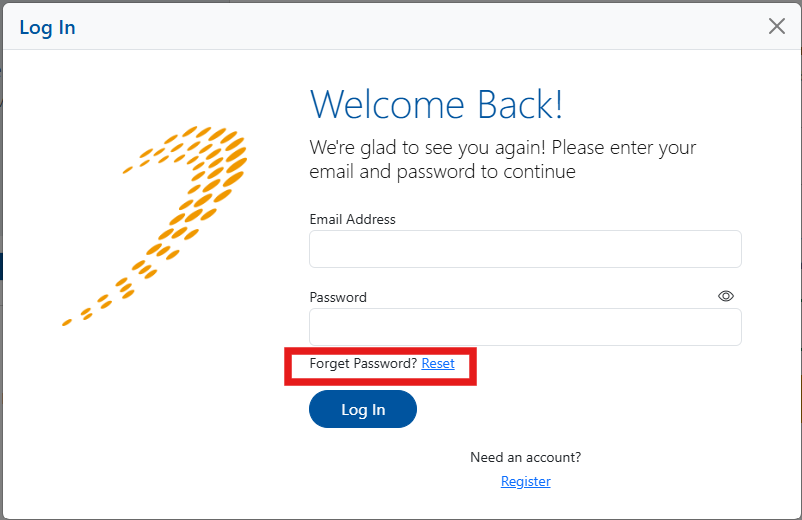
Clicking the blue "Reset" link will prompt you for your email. Fill this out and click on the blue "Send Password Reset" button. This should send out the reset link. Note that this link expires, so make sure you do it quickly.
If you do not recieve a reset link, check your spam. Also make sure standards@nimonik.com is not blocked in any of your email filters. If after a an hour you still have not received an email, reach out to us at standards@nimonik.com.
Was this article helpful?
That’s Great!
Thank you for your feedback
Sorry! We couldn't be helpful
Thank you for your feedback
Feedback sent
We appreciate your effort and will try to fix the article