Before you download you're document, you will need to verify that the license you've purchased allows downloads. This information is readily available on the product page by scrolling over the "i" next to the "pdf" option.
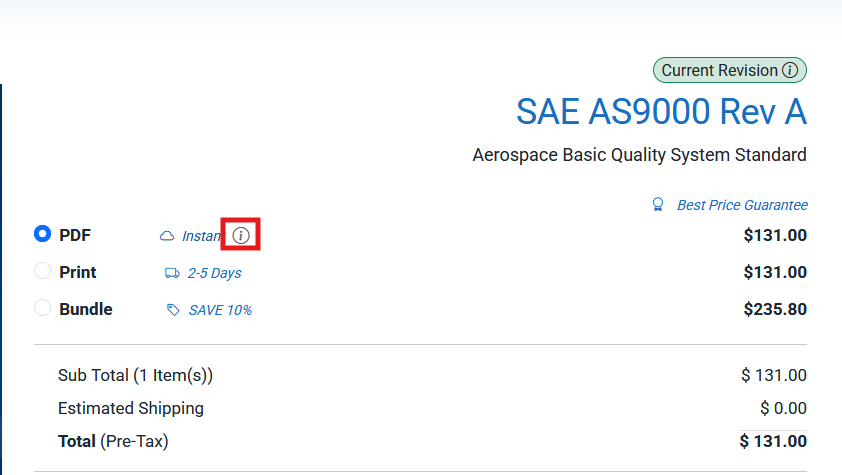
Hovering over this icon should automatically pull up something like this:
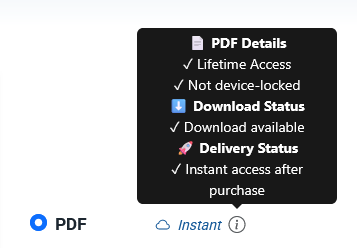
This will let you know if the document is printable, downloadable, and whether or not the document needs to be special ordered. In this example, you can see that the standard can be downloaded. If the document can't be downloaded it will say "Download not available". This restriction does not exist for subscription customers. Subscriptions are a great option for companies that require multiple licenses as convenient as possible. You can learn more about our subscriptions through our website: https://nimonik.com/standards/
Note that ASTM standards are not printable or downloadable per the publisher's request. They are view only through the website. This restriction does not exist for subscription customers.
Now that you've determined that your standard is downloadable, go to your library. You can go to your library by clicking the person icon on the top right, and selecting the "My library" option.
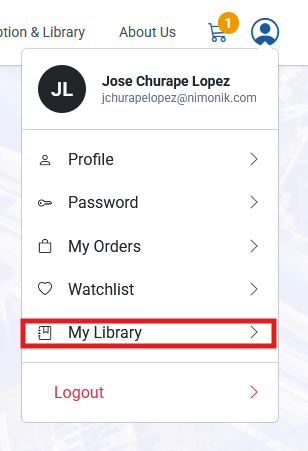
Once in your library you should see all the document's you've purchased with two icons: an eyeball and a printer. The icon that is important for us is the eyeball. Scrolling over the eyeball will reveal two options: view and download. Clicking on download will save a watermarked copy of your order in your desired location.
Was this article helpful?
That’s Great!
Thank you for your feedback
Sorry! We couldn't be helpful
Thank you for your feedback
Feedback sent
We appreciate your effort and will try to fix the article